If you run a small business in the US, you may have heard that websites can draw complaints under the Americans with Disabilities Act. No badge, plugin or scan can tell you your site is compliant, but you can check a lot yourself in an afternoon.
This guide covers what the Department of Justice (DOJ) says about business websites, what it does not say, and a checklist built from its own list of barriers. This is not legal advice. If you are facing a complaint or a demand letter, speak to a lawyer who handles ADA matters.
Key Takeaways
- Title III of the ADA covers businesses open to the public, and the DOJ has held since 1996 that the ADA applies to web content.
- The DOJ has no regulation setting a detailed technical standard for private business websites.
- The 2024 rule that names WCAG 2.1 Level AA covers state and local governments, with compliance dates of April 26, 2027 and April 26, 2028.
- Color contrast is one item on the DOJ’s list, alongside alt text, captions, form labels, zoom, headings and keyboard access.
- The DOJ says a “clean” automated report does not necessarily mean everything is accessible.
Does the ADA Apply to My Business Website?
It can, if your business is open to the public. The DOJ’s guidance says “Title III prohibits discrimination against people with disabilities by businesses open to the public”, with examples such as retail stores, banks, hotels, medical offices and restaurants.
On websites, it states that “the Department has consistently taken the position that the ADA’s requirements apply to all the goods, services, privileges, or activities offered by public accommodations, including those offered on the web.” Whether your business counts, and what a court would expect of your site, depends on facts this post cannot weigh, so take that question to a lawyer.
Is There an Official ADA Standard for Business Websites?
No, not for private businesses. The DOJ says: “The Department of Justice does not have a regulation setting out detailed standards, but the Department’s longstanding interpretation of the general nondiscrimination and effective communication provisions applies to web accessibility.”
Businesses can choose how they make their online goods and services accessible, but the guidance is clear that they still have to be accessible. It says “Existing technical standards provide helpful guidance concerning how to ensure accessibility of website features,” and names WCAG and the federal Section 508 Standards. The guidance is dated March 18, 2022, and the page notes that guidance documents posted there have “no legally binding effect”.
What Does the 2024 Web Rule Mean for My Business?
The 2024 web rule covers state and local governments, not private businesses. Its fact sheet says “The Web Content Accessibility Guidelines (WCAG) Version 2.1, Level AA is the technical standard for state and local governments’ web content and mobile apps.” An Interim Final Rule published on April 20, 2026 set these compliance dates:
| Who | Compliance date |
|---|---|
| State and local governments with a population of 50,000 or more | April 26, 2027 |
| Governments with a population under 50,000, and special district governments | April 26, 2028 |
A private company can still be reached through work it does for a government. The fact sheet’s example is a city parking app, which “must meet WCAG 2.1, Level AA even if the app is run by a private company.” For everyone else, WCAG 2.1 AA is a sensible target to choose, but it is not a requirement written into a regulation for private businesses.
What Should an ADA Website Checklist Include?
Start with the practices the DOJ lists, which it says are “not a complete list of things to consider”.
- Color contrast. Text needs enough contrast with its background to be readable by people with limited vision or color blindness.
- Not color alone. If red text marks a required field, add the word “required” as well, which is the DOJ’s own example.
- Alt text. Images that carry meaning need a text alternative, and the DOJ says “the text should be short and descriptive.”
- Captions. Videos need synchronized, accurate captions that identify the speakers.
- Form labels. Each field needs a label a screen reader can announce, clear instructions, and error messages that say how to fix the problem.
- Zoom. Zoom your browser to 200 percent, the figure in WCAG’s resize text rule, and check that nothing is cut off. If it breaks, ask your developer about sizing text in rem so it scales when visitors enlarge it.
- Real headings. Section titles should be built as headings, not just big bold text, so screen reader users can jump between them.
- Keyboard access. Press Tab through the page without a mouse and make sure you can reach every link, menu, button and field.
- A way to report problems. Give visitors a route to tell you about barriers, as the DOJ suggests.
Test your home page, contact or booking form, checkout, and top service or product pages first.
How Do I Check Color Contrast on My Website?
Measure each text and background pair and compare it with the WCAG thresholds. Success Criterion 1.4.3 says “The visual presentation of text and images of text has a contrast ratio of at least 4.5:1”, except that “Large-scale text and images of large-scale text have a contrast ratio of at least 3:1”. WCAG defines large-scale text as “at least 18 point or 14 point bold”.
Buttons, form field borders and meaningful icons fall under Success Criterion 1.4.11, which asks for “a contrast ratio of at least 3:1 against adjacent color(s)”.
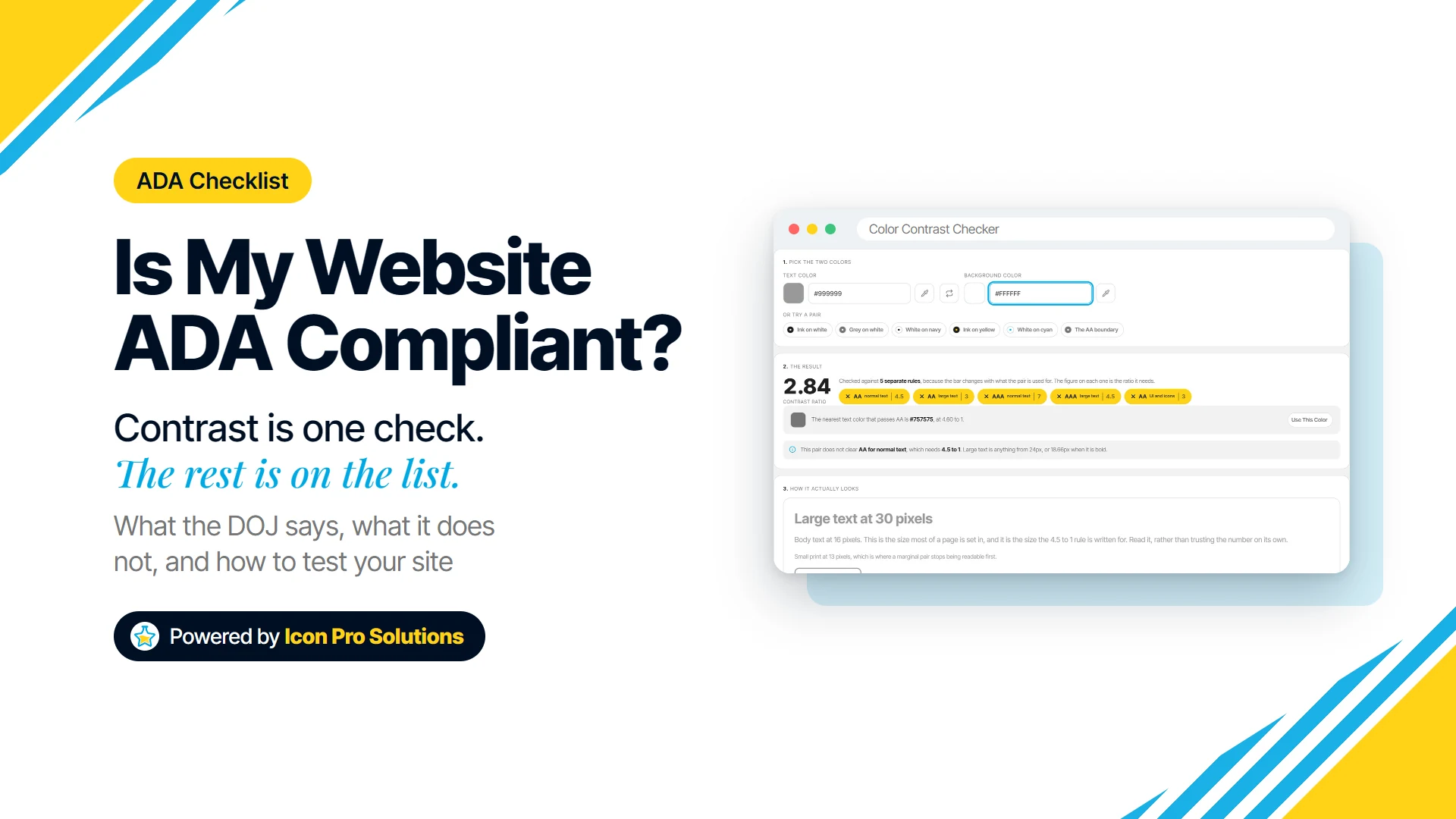
Enter the two colors in our color contrast checker for text and background pairs to get the ratio and a pass or fail for five levels: AA normal text (4.5:1), AA large text (3:1), AAA normal text (7:1), AAA large text (4.5:1), and UI and icons (3:1). It decides on the unrounded ratio, and it blends a transparent color over its background before measuring.
Light gray #999999 on white, for example, measures 2.84:1 and fails all five. The checker then offers the nearest passing text color, #757575 at 4.60:1, previews the pair at 30, 16 and 13 pixels, and lists nine tints and shades with their ratios.
Know its limits. It checks one pair at a time, so you find the colors yourself, although in Chrome and Edge an eyedropper button can pick a color from your screen. It does not scan pages or check alt text, captions, forms, headings, zoom or keyboard access.
Is My Squarespace, Wix or Shopify Website ADA Compliant?
The platform alone cannot answer that, because much of the DOJ’s list depends on what you add: alt text, captions, form labels and colors. Your template decides the rest, such as how menus behave with a keyboard and whether headings are real headings. Run the same checklist whatever builder you use, and raise a template that fails on keyboard access or headings with its developer, or replace it.
Can a Scanner or Overlay Make My Website Compliant?
No tool can certify compliance. The DOJ says “Automated accessibility checkers and overlays that identify or fix problems with your website can be helpful tools, but like other automated tools such as spelling or grammar checkers, they need to be used carefully.”
It adds that “A ‘clean’ report does not necessarily mean everything is accessible,” and that “Pairing a manual check of a website with the use of automated checkers can give you a better sense of the accessibility of your website.”
What Should I Do Next?
- Work through the checklist on your five most important pages and write down every failure.
- Fix what you can yourself, since alt text, captions, colors and form labels are usually editable content.
- Add a contact route for accessibility problems, such as an email address in your footer.
- Speak to a lawyer if you have received a complaint or want to understand your legal position.
If the problems sit in the theme or the build itself, our website redesign and rescue service starts with an audit of the current site and a written scope of what changes before any work begins. To talk it through with us first, book a free consultation.
FAQs
Which Version of WCAG Should I Use?
WCAG 2.1 Level AA is the version the DOJ’s Title II rule names, so it is the clearest reference point. The W3C has since published WCAG 2.2, and the contrast rules quoted here, 4.5:1 for normal text and 3:1 for large text and interface parts, read the same in both.
Do I Need to Meet AAA Contrast?
Nothing in the DOJ sources above asks for AAA. WCAG’s AAA rule, Success Criterion 1.4.6, asks for at least 7:1 on normal text, while the Title II rule names Level AA.
Where Can I Ask the Government About the ADA?
The Department of Justice runs the ADA Information Line at 800-514-0301 (TTY 1-833-610-1264), listed on ADA.gov. The DOJ describes its web guidance as informal guidance, so for advice on your own situation you still need a lawyer.